
The Active Grid is a special component that attempts to answer one key question. What Cells should be loaded?
In order to answer that question, it tracks a Player object and uses that Player's position in combination with Loading Blueprints in order to determine the Active Cells that it would like to be loaded. It then registers with the World as users of those Active Cells. After processing other registered users, including World Regions and other Active Grids, the World decides which World Cells to ultimately load.
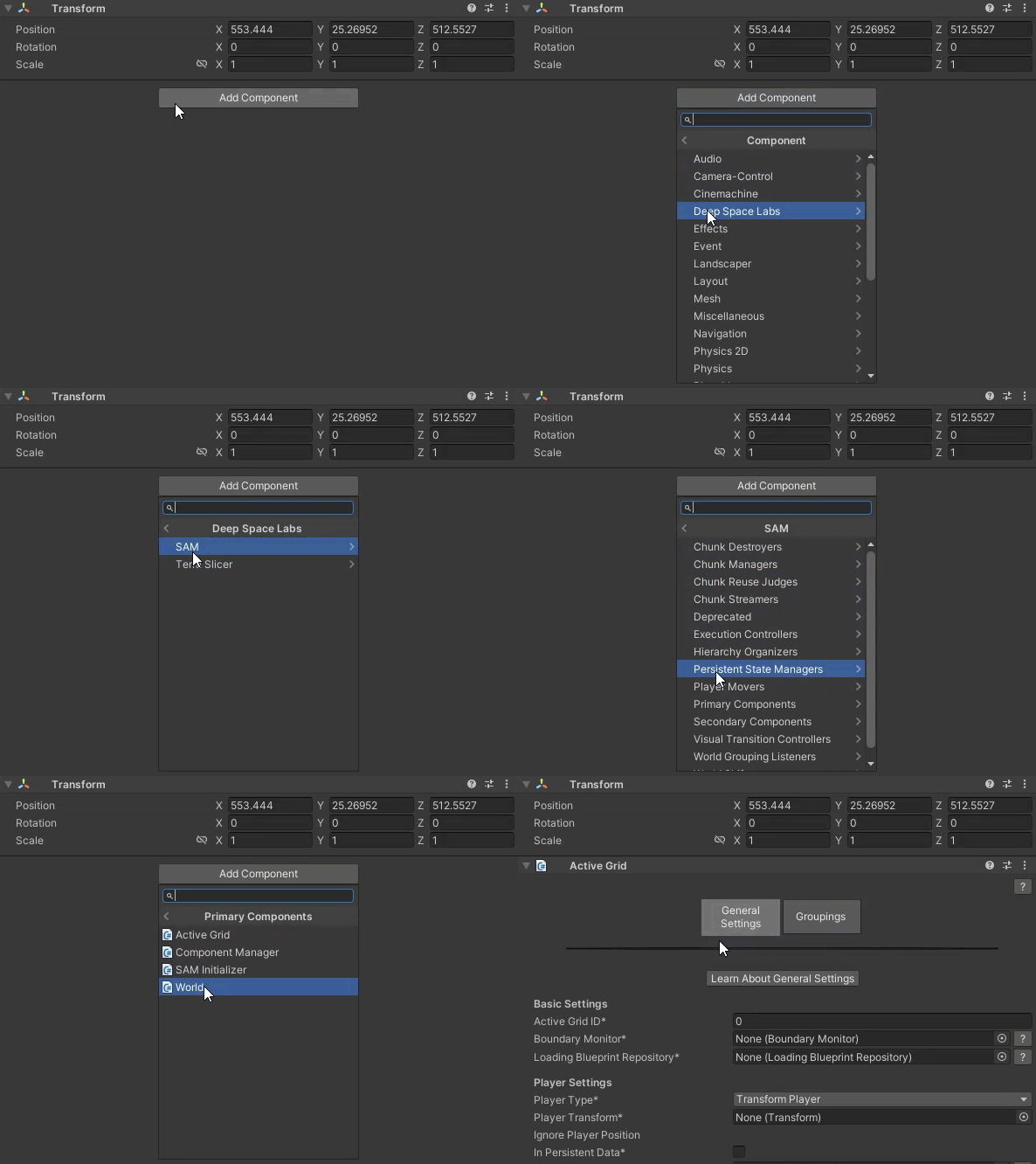
You can add this component by selecting a game object and then selecting from the Top Menu Bar:
Component -> Deep Space Labs -> -> SAM -> Primary Components -> Active Grid

or by selecting a game object and using the Add Component menu via its inspector:
Component -> Deep Space Labs -> -> SAM -> Primary Components -> Active Grid
Even though it's called the Active Grid, in truth this component can track and manage multiple grids of cells, which allows it to be used with multiple Zone Groupings on a single World.
Like the World, the Active Grid can have one or more Groupings. Depending on the number of Zones on your World and whether you are using an Endless/Repeating World, each of these Groupings might manage multiple Grids of Cells at the same time. Each of these Groupings is completely independent from other Groupings, which allows you to enable, disable, and change the loading behavior of the Groupings without affecting other Groupings.
While each Active Grid can only be synced with a single World at a time, there is no limit to the number of Active Grids that can be synced to the same World.
This allows you to track multiple Players at the same time; the World will process all Active Grid Cells needed by the Players and load the highest quality LOD Asset Chunks needed for each Cell.
This functionality can also be used in games that make use of multiple cameras where you need to switch between the cameras at a moments notice. One camera may be focused on the Player, while another is focused on some distant hallway. The second camera would just use a dummy Player object to force loading of Cells that must be shown by it.
It's important to note that Active Grids are not the only way to answer the question of what should be loaded, even if they are the easiest way.
World Regions are a powerful tool for configuring pre-set Cells that can be loaded at runtime using triggers or other logic. In addition, the World offers methods for adding/removing Cells directly which allow you to implement fully customized solutions, such as loading cells based on their proximity to the player.